


Photo Retouch: Free Photo Editing App
The Photo Retouch – Remove Items from Photo app empowers you to eliminate unwanted elements such as people and objects, effortlessly cleaning and refining your cherished photographs.
Photo Retouch: Your go-to free photo editing app for effortless enhancements! Unlock powerful editing tools, filters, and effects to elevate your photos to perfection. Download now for seamless editing and stunning results!
Photo Retouch offers a plethora of options within its free photo editing app. Explore an array of powerful tools, from precise adjustments to artistic filters, ensuring your photos stand out. Elevate your editing game—download now and discover endless possibilities!
Using the Photo Retouch – Remove Items from Photo app, you can select images from your gallery and proceed to erase lines, unwanted pictures, and other undesired elements from your favorite snapshots. Employ the Brush or Lasso tool, accessible at your fingertips, to mark areas you wish to erase, including unwanted images, objects, or distractions. Once marked, simply tap the ‘Go’ button, and within seconds, the app processes your request, leaving you with an enhanced and pristine image. Share these perfected memories with your friends directly from the app.
The Object Removal tool is your solution for eliminating distractions from your photos. Choose between the Brush or Lasso options, mark the content to be removed, and initiate the process with a simple tap of the ‘Go’ button. For situations requiring the removal of defects or duplications, the Clone Stamp tool is at your disposal. Fine-tune the Stamp Size, Hardness, and Opacity to suit your specific needs.
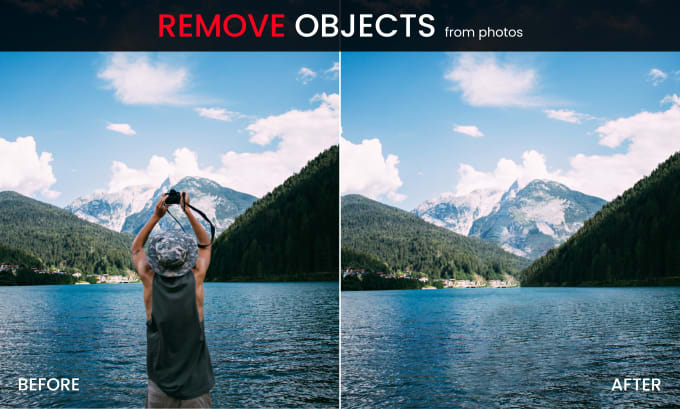

The Remove Unwanted Content feature, a part of the Touch Eraser tool, allows you to effortlessly erase previously cloned areas. You have the flexibility to customize the Eraser Size, Hardness, and Opacity to align with your preferences.
In addition to removing unwanted content, the app lets you erase photo backgrounds, creating transparent spaces that you can then replace with various beautiful backgrounds.
This versatile tool is perfect for retouching photos, whether it’s removing unwanted objects, performing background editing, or enhancing your overall image quality.









I like
sqdqsdqsdkjkhqskdjhjhsdhkjQSDQKJHKJ